Information on CCM19 Regarding Google PageSpeed
1. Introduction
A website’s loading speed is a critical factor for user experience and search engine rankings. Slow loading times often lead to higher bounce rates and poorer SEO-results.
Therefore, optimizing page load speed—or Google PageSpeed metrics—is of great importance to website operators in order to improve both visitor satisfaction and visibility in search engines.
Through various technical measures, CCM19 ensures that the cookie banner does not negatively impact the website’s-performance—on the contrary, using CCM19 can actually improve page speed.
According to internal statistics, the pure server-processing time for the CCM19-script averages less than 5 milliseconds. This describes the time it takes for the server to process the request and deliver the script.
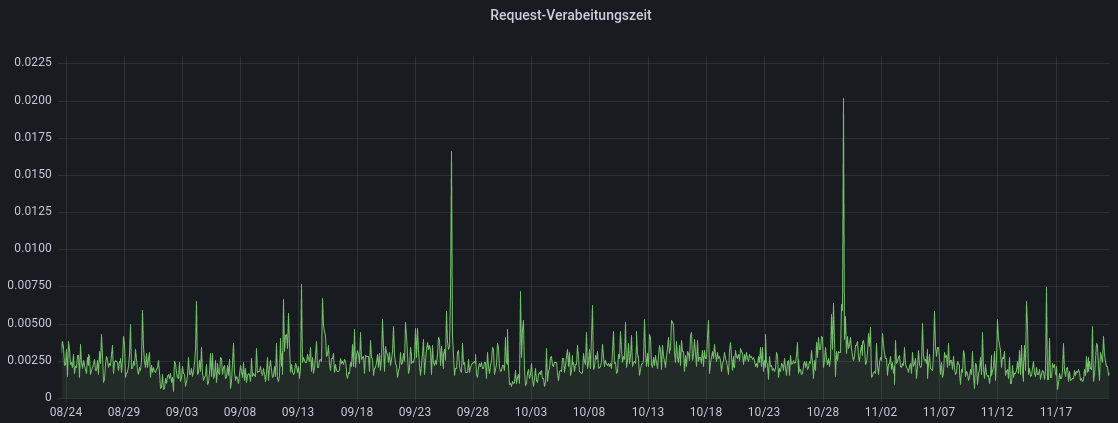
The graph shows the average load time in milliseconds over a period of approximately 3 months
2. Measures Implemented to Speed Up CCM19
To optimize the loading speed of the CCM19-script, various technical adjustments were made. These measures help maximize performance and ensure rapid availability of the consent-management system.
Efficient Script-Management
By minimizing and compressing the executed scripts , unnecessary code-parts are removed and the file size is reduced. This results in faster loading times, as CCM19 consumes fewer resources and operates more efficiently.
Preloading app.js and Other Files
Important resources such asapp.jsare loaded in advance before they are needed. Thispreloadingensures that these files are immediately available, which significantly shortens page load times.
Lazy Loading of Banners and Content
With lazy loading , banners and other content are loaded only when they are actually needed. This reduces the initial page load time and ensures that only the resources that are currently relevant are loaded.
Image element is hidden until the settings-icon is fully loaded
For example, the settings-icon is not displayed until it is fully loaded to avoid loading incomplete icons. This improves the Largest Contentful Paint (LCP) and ensures faster visual stability.
Placeholder for Scripts
A placeholder for scripts, particularly for the “Detail”-button in the “-” list, ensures that the button is displayed consistently even if the script has not yet fully loaded. This prevents Cumulative Layout Shifts (CLS) and contributes to a stable page structure, which meets Google PageSpeed requirements.
3. Additional Optimization Options in the CCM19-Backend
In addition to the automatically implemented optimizations, the CCM19-backend offers additional options that allow users to further improve their website’s loading speed. These configurable settings help tailor performance specifically to individual requirements.
Optimizing Largest Contentful Paint (LCP)
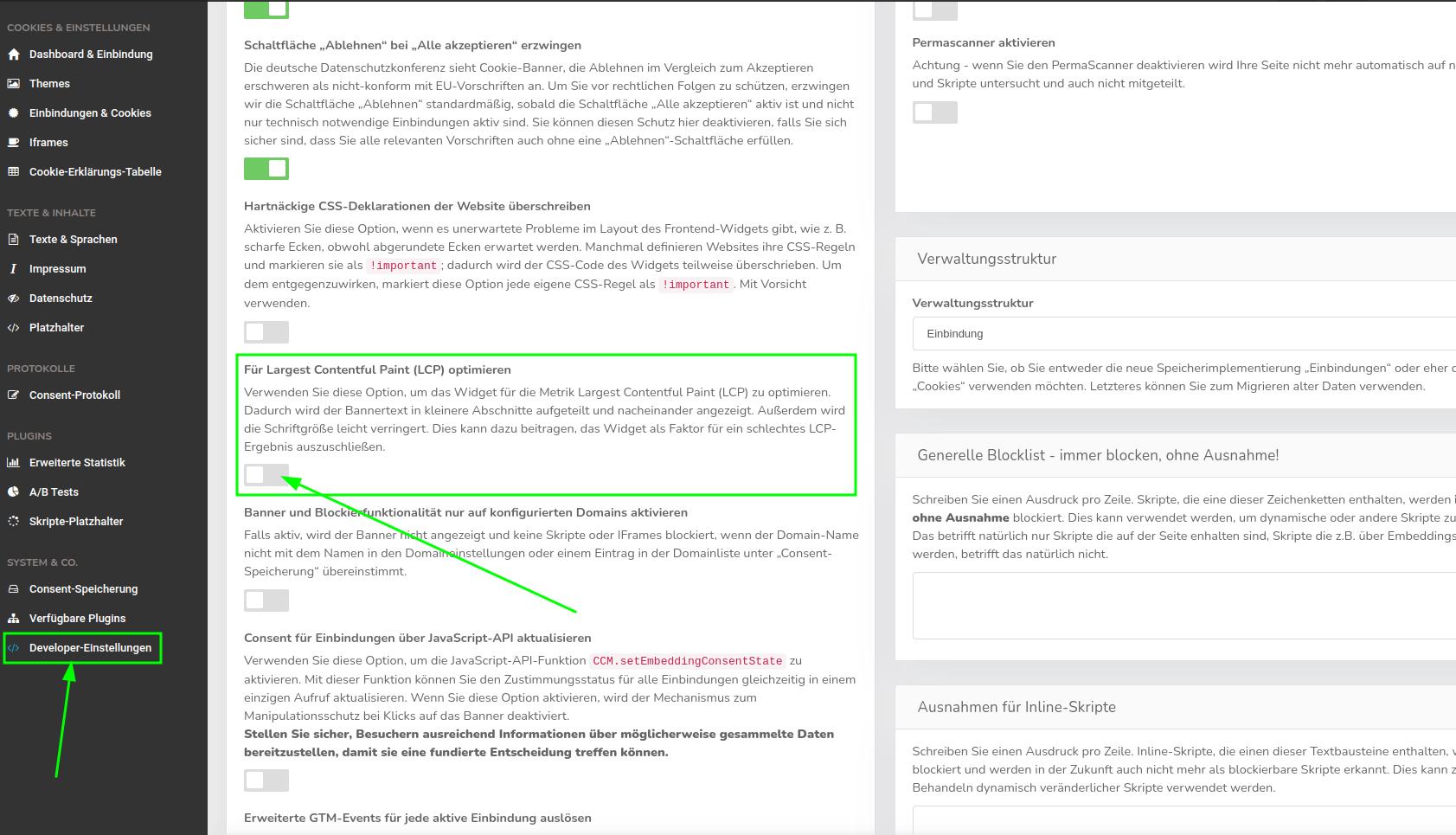
The CCM19-backend includes an option that splits the banner text into smaller div-elements. Splitting the long intro-text into several smaller pieces can ensure that the CCM19 cookie banner is no longer the relevant element for the Largest Contentful Paint (LCP) is no longer the relevant element.
To enable this feature, follow these steps:
- Select the appropriate domain in the dashboard.
- Click onDeveloper Settings in the left-hand menu.
- Scroll down until you find the option “For Largest Contentful Paint (LCP).”
- Enable the option by simply toggling the switch.
- Save the setting.
Integration of External Scripts (e.g., Google Analytics)
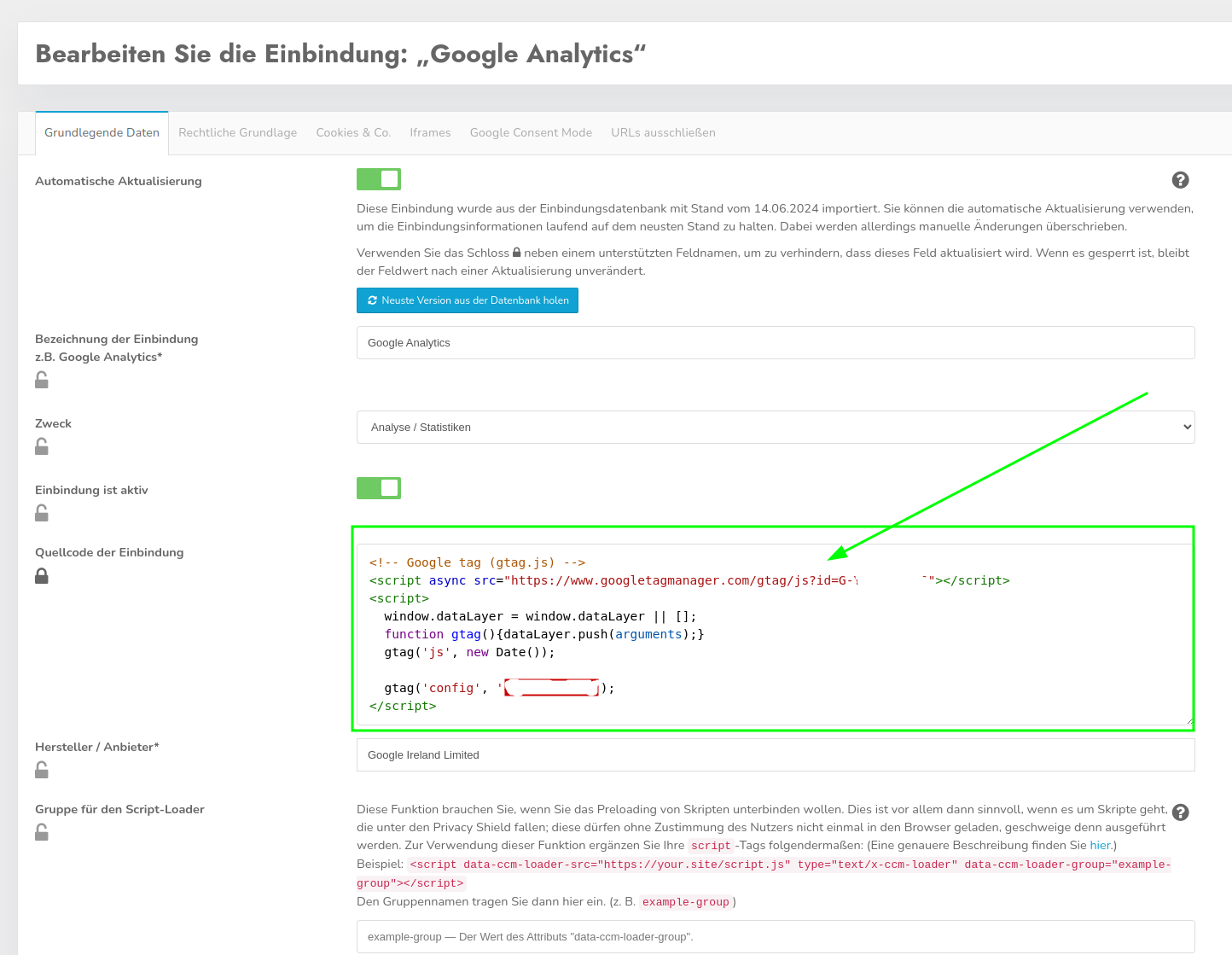
Another way to optimize loading speed is to load external scripts, such as those fromGoogle Analytics , directly through CCM19. The script is removed from the page’s source code and stored in CCM19 instead, so that it is not loaded every time the page is viewed, but only when the page visitor has given their consent. Because this significantly reduces the number of scripts on the page, the page can load faster. The scripts are only included if they are permitted for use based on the decision made in the Consent-.
To add an external script, follow these steps:
- In the left-hand menu, navigate to Integrations & Cookies.
- Select the integration to which you want to add the script.
- Click the green pencil-icon to edit the integration.
- Add the desired code under Embedding Source Code and save the setting.
Widget-Cache
TheWidget-Cacheis enabled by default and ensures that frequently used content is cached. This speeds up loading times when the page is visited repeatedly. If the cache has been disabled, this may result in longer loading times. It is therefore worth checking the cache-settings in the backend.
You can find the widget-cache-settings under the menu item "-" and then "Developer-Settings."
Minification of CSS and JavaScript
CCM19 offers the option to minify CSS- and JavaScript-files, which removes unnecessary whitespace and comments and reduces the file size. This option is enabled by default and helps speed up the loading time of CCM19-elements. If you encounter issues with page load speed related to CCM19, you should check whether minification is enabled in your account.
The “Minify JavaScript and CSS” option can also be found under the “-” menu item “Developer-Settings.”
4. CCM19 as the Initiator of Other Scripts
Sometimes, in load speed reports, it may appear as though CCM19 is responsible for load times of several seconds because long load times are attributed to CCM19’s app.js file. However, this is only because CCM19 initially blocks other scripts on the website so that it can release them later once consent has been granted. As a result, CCM19 may appear as the initiator of the scripts in some tools that measure page speed, and the total load times of all blocked scripts on the page are attributed to CCM19’s app.js. However, this is a misleading representation because the actual loading time is, of course, caused by requesting the blocked scripts from other servers.
To resolve this issue, as many scripts as possible should not be integrated directly into the website but should instead be loaded via CCM19, as described in section 3. Since the scripts no longer need to be blocked, there is also no longer any unnecessary loading time before consent is granted that could be attributed to CCM19’s app.js.
5. Factors That CCM19 Cannot Influence Regarding Load Time
The actual load time experienced by the user is influenced by several factors that go beyond server---processing time. These include:
- Network latency: The time required to send data back and forth between the server and the user-. The greater the geographic distance, the higher the latency.
- SSL-Encryption: The effort required for secure data transmission, which takes time on both the user- and server sides.
- DNS-Lookup: The time the browser needs to find the script’s server address.
- Browser-Processing: The time the browser needs to download, parse, and execute the script.
- Caching: If the script is already in the browser-cache, the load time is significantly reduced. If not, it must be reloaded entirely.
Conclusion
The CCM19 cookie-banner has been optimized so that it normally does not negatively impact page load speed. Additionally, the script-integration via CCM19 even offers a powerful way to significantly improve the website’s PageSpeed-score.
If, however, a slowdown in loading time is attributable to CCM19, there are a few settings you should check. If none of the measures mentioned in this article help, you’re always welcome to contact our support team with your issue. We’ll look into the issue and help you resolve it. Simply contact us by email at info@ccm19.de or by phone at +49 (0)228 536 637 26.